YOUR AI. YOUR CHOICE.

Rise works where you work.

Rise works where you work.

Bring Rise to your preferred AI assistant through MCP.

Open Ai

Claude

Gemini

Copilot

Perplexity

Grok

DeepSeek

+ Other MCP-compatible assistants

+ Other MCP-compatible assistants

LESS CLICKING. MORE DOING.

A simpler way to

work with Rise.

MCP, or Model Context Protocol, connects your AI assistant to your Rise account. Ask a question in your own words and get an answer using your live Rise data. From payroll obligations to a missing payslip, turn everyday questions into a conversation. Give admins fewer screens to navigate and employees fewer reasons to ask for help.

YOUR ROLE. YOUR RISE.

What would you

like to get done?

FOR HR, FINANCE & MANAGERS

Less navigating.

More moving forward.

Stay on top of your people, payroll, and tax setup without moving between screens in Rise.

BG

YOUR ROLE. YOUR RISE.

What would you

like to get done?

FOR HR, FINANCE & MANAGERS

Less navigating.

More moving forward.

Stay on top of your people, payroll, and tax setup without moving between screens in Rise.

BG

YOUR ROLE. YOUR RISE.

What would you

like to get done?

FOR HR, FINANCE & MANAGERS

Less navigating.

More moving forward.

Stay on top of your people, payroll, and tax setup without moving between screens in Rise.

BG

Pay & tax documents

Pay & tax documents

Pay & tax documents

View and download payslips and W-2s. Check year-to-date earnings, tax paid, bonuses, and deductions.

View and download payslips and W-2s. Check year-to-date earnings, tax paid, bonuses, and deductions.

Leave & time away

Leave & time away

Leave & time away

Check leave balances and request status. Book leave or sick leave, view your history, or cancel a request.

Check leave balances and request status. Book leave or sick leave, view your history, or cancel a request.

Benefits & documents

Benefits & documents

Benefits & documents

See enrolled benefits, tax details on file, employment contracts, other documents, and your Rise to-do list.

See enrolled benefits, tax details on file, employment contracts, other documents, and your Rise to-do list.

ONE RISE CONNECTION. YOUR CHOICE OF AI.

Your assistant.

A whole new workflow.

Explore different payroll and HR conversations across your favorite AI assistants.

Payroll funding⌄
···
What do we need to fund our next payroll?
↗Used Rise✓

You need to add $8,500 to cover the next payroll obligations.

Total obligations$48,500
Rise balance$40,000
Funding gap$8,500

Would you like to review what’s included in that total?

+↗ Rise
Team Admin · Illustrative conversation with sample data

Illustrative assistant screens, not product screenshots. Sample people and amounts. Connection setup varies by assistant and workspace. Changes in Rise require browser confirmation.

THE REPORTS YOU ALREADY RELY ON

Ask for the report.

Skip the search.

Get Rise’s pre-built reports with a plain-language request. Find the information your next decision depends on.

“Pull last month’s payroll journal.

Rise’s pre-built reports are supported. Custom reports are not currently available.

01 Payroll journal

02 Payment obligations

03 Payments & invoices

04 PTO requests & balances

05 Active employees

06 New hires

Rise Employer of Record guide covering global hiring, international employment compliance, and payroll solutions.

YOUR ASSISTANT. YOUR CONTROL.

A conversation starts it.

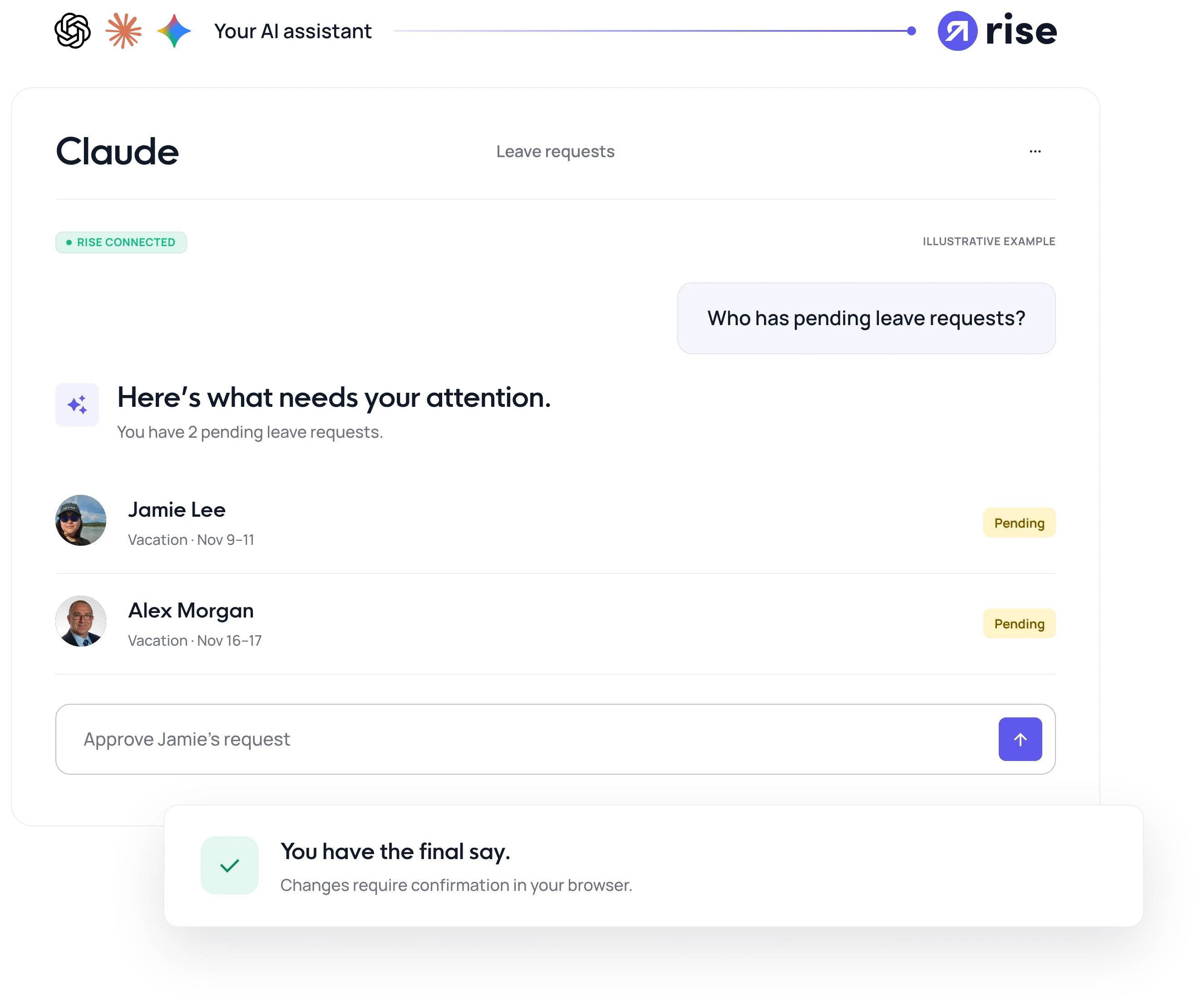
You confirm it.

You confirm it.

Read-only questions get answers directly. Anything that changes data asks you to confirm in your browser before Rise applies it. Approving leave. Adding a bonus. Raising a termination request. Nothing changes silently.

The right information, for the right person.

Employees only see their own information. Team Admins see information for the people they look after.

FROM CONNECTED TO CONVERSATION

Your Rise account.

A new way to work.

The connection is built around the Rise login you already use.

01

Connect your assistant

Add the Rise MCP server as a custom connector in a supported AI assistant.

01

Connect your assistant

Add the Rise MCP server as a custom connector in a supported AI assistant.

02

Sign in to Rise

Use your existing Rise login to connect your account and access the information available to your role.

02

Sign in to Rise

Use your existing Rise login to connect your account and access the information available to your role.

03

Ask in plain language

Check your leave balance, review payroll obligations, or find a report. Start with a question.

03

Ask in plain language

Check your leave balance, review payroll obligations, or find a report. Start with a question.

What is the Rise MCP server?

Can employees see someone else’s information?

Can the assistant change data without telling me?

Can I run payroll or change salaries?

What is the Rise MCP server?

Can employees see someone else’s information?

Can the assistant change data without telling me?

Can I run payroll or change salaries?

Can I create custom reports?

How are termination requests handled?

What else is not supported?

Does this work across Rise products?

Can I create custom reports?

How are termination requests handled?

What else is not supported?

Does this work across Rise products?